
A typical unstructured day tends to look something like this: an email here, a quick creative task there, a phone call, back to a different piece of writing, a brief errand, then a return to the original creative task, now considerably harder to re-enter than it was the first time. None of these individual switches feels particularly costly in the moment. Collectively, across a full day, they add up to something genuinely exhausting — and considerably less productive than the same total time spent with fewer, more deliberate transitions.
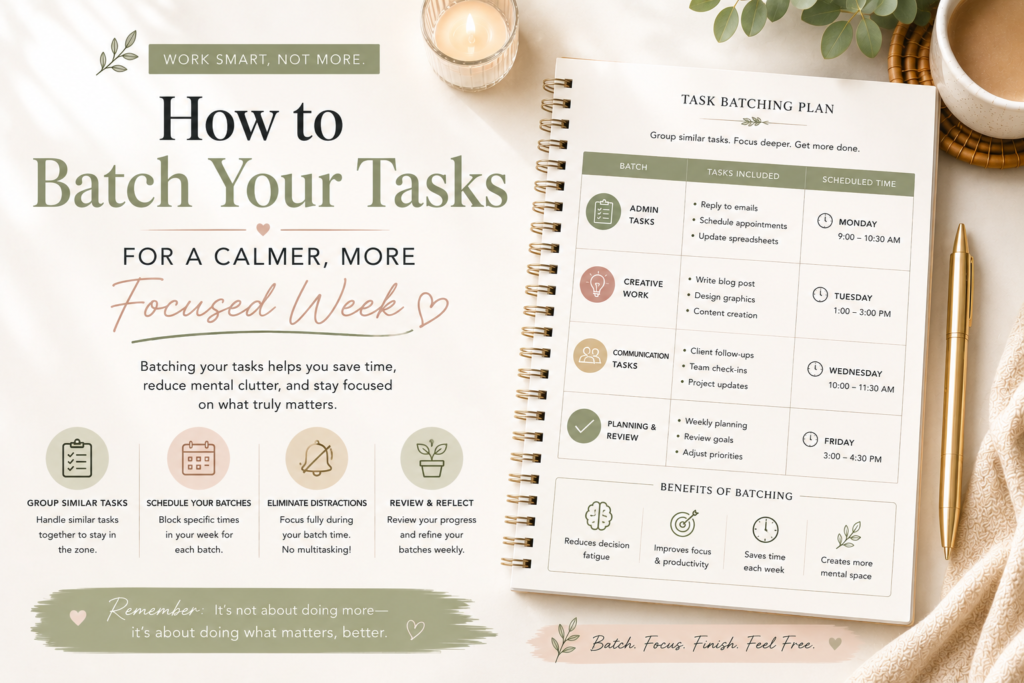
Task batching is the practice of grouping similar types of tasks together into dedicated blocks of time, rather than scattering them throughout the day in whatever order they happen to arise. Instead of alternating between emails, creative work, calls, and administrative tasks every twenty minutes, batching consolidates each type into its own dedicated window — all emails together, all calls together, all focused creative work together.
This guide covers exactly why batching works, how to identify what genuinely benefits from being batched in your own week, and how to build it into a sustainable weekly rhythm rather than an occasional, inconsistent practice.
Why Constant Task Switching Is So Costly
Understanding the specific cost of switching between different types of tasks explains why batching produces such a meaningful improvement.
Every switch carries a genuine cognitive cost, not just a perceived one. Research on task switching consistently finds that moving between different types of work requires your brain to disengage from the mental context of the first task and reconstruct the context of the second. This is not instantaneous — it takes measurable time and mental effort, even for switches that feel quick and effortless in the moment.
Attention residue lingers after a switch, even when the switch feels complete. Some of your attention remains attached to the previous task for a period after you have moved on, subtly reducing the quality of focus available for whatever comes next. This effect is more pronounced the more different in nature the two tasks are — switching between two similar emails costs less than switching from a creative writing task to a detailed financial spreadsheet.
The cumulative cost across a full day is considerably larger than any single switch suggests. A single switch might cost only a few minutes of reduced focus. Multiplied across dozens of switches throughout an unstructured day, the total cost becomes substantial, even though it remains largely invisible in the moment, since no single switch feels dramatically costly on its own.
Different types of work benefit from genuinely different mental states. Focused, analytical work benefits from a calm, uninterrupted mental state. Communication tasks benefit from a more responsive, socially attuned state. Creative work often benefits from yet another distinct mode of thinking. Constantly moving between these different states, rather than allowing each to be sustained for a meaningful period, prevents any of them from being fully entered.
What Genuinely Benefits From Batching
Not every task needs to be batched, and understanding which categories benefit most helps you apply the principle where it genuinely matters, rather than attempting to force an unnecessarily rigid structure onto every part of your day.
Communication tasks — emails, messages, calls — batch particularly well. These tasks share a similar mental mode, and batching them into dedicated windows, rather than responding continuously throughout the day, dramatically reduces the total number of switches while rarely causing any genuine harm, since very few messages require truly immediate responses.
Administrative and routine tasks batch well. Invoicing, filing, scheduling, and other routine administrative work share a similar low-creativity, procedural mental mode, making them natural candidates for grouping into a single dedicated block.
Similar creative or analytical tasks within the same project batch well. If you have several related pieces of writing, several similar pieces of analysis, or several related creative tasks, working through them consecutively, within the same mental mode, tends to be considerably more efficient than interspersing them with unrelated work.
Errands and external tasks batch well. Physical tasks requiring you to leave your workspace — errands, in-person meetings, external appointments — benefit from being grouped into the same portion of the day, rather than requiring multiple separate transitions in and out of focused work.
Genuinely urgent, time-sensitive tasks generally do not batch well, since their defining feature is that they cannot wait for a scheduled batch window. Batching works best for tasks that can reasonably be deferred to a specific, planned time without meaningful cost.
How to Build Task Batching Into Your Week
Step 1: Audit Your Typical Week for Task Categories
Before batching anything, spend a few days simply noting the different types of tasks that make up your typical week. Most people find their work falls into somewhere between four and eight broad categories — communication, focused project work, administrative tasks, meetings, creative work, and so on.
Step 2: Identify Which Categories Are Currently Scattered Throughout Your Day
For each category, consider whether it currently happens continuously throughout the day, in small, scattered increments, or whether it is already somewhat consolidated. The most scattered categories typically offer the greatest potential benefit from deliberate batching.
Step 3: Assign Specific Windows for Your Highest-Value Batches
Rather than attempting to batch every category simultaneously, start with the one or two that feel most scattered and most costly to your focus. Assign a specific, consistent time window for this category — perhaps checking and responding to messages only at 9am, 1pm, and 4pm, rather than continuously throughout the day.
Step 4: Protect Your Batch Windows With the Same Seriousness as a Meeting
A batch window that is easily interrupted or skipped provides little benefit over the scattered approach it is meant to replace. Treat your batch windows as genuine commitments, communicating them to colleagues or family members if needed, so the boundary is respected rather than casually overridden.
Step 5: Build in Transition Time Between Different Batches
Moving directly from one type of batched work into a completely different type still carries some transition cost, even with batching in place. A brief buffer — even five minutes — between distinctly different batches allows for a cleaner mental transition than moving directly from one to the next.
Step 6: Review and Refine Your Batches Weekly
As part of a regular weekly planning session, briefly assess how well your current batching structure is working. Adjust based on what you observe.
Batching Across a Full Week, Not Just a Single Day
While much of the conversation around batching focuses on structuring a single day, the same principle applies powerfully at the weekly level, particularly for certain categories of work.
Consider dedicating specific days to specific types of work, rather than attempting to touch every category every day. Some people find genuine value in a “meeting day” concentrating most external calls and meetings into one or two specific days, freeing the remainder of the week for more sustained, uninterrupted focus.
Batch errands and external appointments into a specific day or half-day, if your schedule allows this flexibility, rather than allowing them to interrupt focused work time throughout the week.
Common Task Batching Mistakes
Attempting to batch everything simultaneously from the very start. Introducing several new batch categories at once, particularly alongside colleagues or teams not yet accustomed to the new structure, tends to create friction and inconsistency. Start with a single, high-value batch category and expand gradually.
Setting batch windows too infrequently for genuinely time-sensitive communication. While reducing the frequency of checking messages provides real benefit, checking only once per day may be impractical for roles requiring more responsive communication. Calibrate your batch frequency to the genuine demands of your specific role, rather than adopting an arbitrary, one-size-fits-all frequency.
Not communicating the change to people who depend on your responsiveness. A sudden shift to batched communication, without any explanation, can create confusion or frustration among colleagues or clients accustomed to more continuous availability. A brief, clear explanation of your new approach generally prevents this friction.
Abandoning batching after a single day it did not work perfectly. Like most changes to established habits, batching often feels somewhat unfamiliar and imperfect in its first few attempts. Treat early friction as normal and adjustable, rather than evidence that the approach itself is flawed.
Using a Weekly Planner to Support Task Batching
A visible, written weekly plan makes task batching considerably easier to establish and maintain than attempting to hold your batch structure purely in memory. Marking your specific batch windows directly within a weekly planner — communication blocks, administrative blocks, protected focus blocks — provides the same passive, constant visibility that supports other structured productivity practices, keeping your batching structure genuinely present throughout the week rather than something you have to consciously remember to maintain. Elabrille’s weekly planning pages, with clear daily time sections, work well for mapping out and maintaining a batched weekly structure.
Pulling It All Together
Task batching addresses a genuine, if often invisible, cost of an unstructured day: the cumulative toll of constantly switching between fundamentally different types of work. By grouping similar tasks into dedicated, protected windows, you reduce the number of these costly transitions considerably, allowing each type of work to receive more sustained, higher-quality attention than a scattered approach would allow.
Start by identifying which categories of your work are currently most scattered throughout your day. Choose one or two to batch first, protect those windows deliberately, and expand the practice gradually as it proves its value. A calmer, more focused week is rarely the result of doing less — it is very often the result of doing the same amount of work with considerably fewer costly interruptions along the way.
Frequently Asked Questions
What is task batching?
Task batching is the practice of grouping similar types of tasks together into dedicated blocks of time, rather than scattering them throughout the day. Instead of alternating between emails, calls, and focused work continuously, batching consolidates each category into its own protected window, reducing the cognitive cost of constantly switching between different types of thinking.
How often should I check email if I’m batching my tasks?
This depends on the genuine demands of your specific role, but many people find checking and responding to messages two to four times a day, at set times, provides most of the benefit of batching while remaining reasonably responsive. Calibrate the frequency to your actual communication needs rather than adopting an arbitrary standard.
Why does switching between tasks feel more tiring than the individual tasks suggest?
Each switch requires your brain to disengage from the previous task’s context and reconstruct the context of the new one, a process that carries a genuine, measurable cognitive cost even when it feels quick. Some attention also lingers on the previous task after switching, a phenomenon known as attention residue, subtly reducing focus quality on whatever comes next.
How do I start task batching without disrupting people who expect quick responses?
Communicate your new approach clearly to colleagues, clients, or family members who might otherwise expect continuous availability, explaining your specific batch windows and when you will next be checking messages. Starting with a single batch category, rather than an abrupt, comprehensive change, also tends to reduce friction during the transition.